A Professional's Take on the New Tuf Gaming Vg34Vql1B
The TUF Gaming VG34VQL1B arrives as a confident entry in the crowded 34-inch ultrawide market, aimed at gamers and power users who want immersive screen real estate without stepping up to a premium OLED or QD-OLED price. This review evaluates the monitor from a practical, real-world perspective—covering image quality, performance, ergonomics, connectivity, and the kinds of buyers who will get the most value from it.
Introduction
Ultrawide monitors have moved beyond a niche enthusiast product into a mainstream choice for gaming, content creation, and productivity. The TUF Gaming VG34VQL1B targets that sweet spot: ample horizontal space for simulation and multitasking, a high refresh rate for smoother gameplay, and a curved panel that enhances immersion. For buyers balancing budget, features, and desk space, the central question is whether this model delivers a meaningful improvement over existing mid-range ultrawides and whether its tradeoffs are acceptable in everyday use.
Design and Build Quality
The VG34VQL1B follows Asus’ established TUF aesthetic—matte plastics, angular accents, and functional rather than flashy RGB elements. The build quality is solid for the segment: a metal-reinforced stand that offers height adjustment, tilt, and swivel, plus a straightforward quick-release VESA mounting option for third-party arms. The curvature (a noticeable but not extreme radius) suits ultrawide workflows and racing or flight simulation, wrapping peripheral vision without introducing distortion for typical desktop tasks.
Practical touches include easily accessible OSD controls and a joystick-style menu nub on the back for quick adjustments. While premium materials like all-metal bezels or machined aluminum are absent, the monitor feels durable and appropriately finished for its price bracket.
Panel, Resolution, and Image Quality
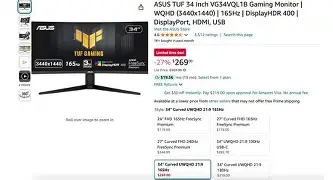
The VG34VQL1B ships with a 34-inch ultrawide panel at the commonly adopted 3440 × 1440 resolution. This pixel density balances clarity and GPU load well—sharp enough for productivity and detailed gaming without requiring top-tier graphics hardware to hit high frame rates in modern titles. The curve helps with immersion in wide-field content and makes text and UI elements more consistent across the desktop.
Being a VA-type panel (the standard for many high-contrast ultrawides), it delivers strong native contrast and deep blacks, which are valuable in dark-room gaming and cinematic content. Compared to IPS alternatives, the VG34VQL1B will generally present punchier dark scenes and better black uniformity, at the cost of slightly narrower viewing angles and potential color/contrast shifts when viewed far off-axis.
Color reproduction out of the box is competent for general work and gaming, though content creators who demand studio-grade fidelity should plan to calibrate with a colorimeter. The monitor supports a broad color gamut that covers a substantial portion of sRGB and extends into DCI-P3 to varying degrees; this makes it a flexible option for both entertainment and light to moderate color work.
Performance: Refresh Rate, Response, and Motion
A key selling point for this model is its high refresh rate, which elevates both competitive play and general interface smoothness. In real-world gameplay—first-person shooters, racing sims, and fast-action titles—the extra frames reduce perceived blur and make camera movement feel more responsive. Motion clarity depends on the overdrive and MPRT modes available in the OSD: toggling between these can reduce ghosting while preserving color integrity.
Shop the latest Electronics picks on Amazon.
View Offers →Because it is a VA panel, there will be a small tradeoff: some dark-to-light transitions can show trailing that an IPS with aggressive overdrive may handle better. However, for the majority of players—especially those who value richer blacks and cinematic visuals—the VG34VQL1B strikes a reasonable compromise. Adaptive sync support (FreeSync/G-Sync compatibility) smooths gameplay with variable frame rates and removes screen tearing when paired with compatible AMD or NVIDIA GPUs.
HDR Performance and Limitations
The monitor offers HDR support, which provides improved highlight handling and more vivid color in supported content. In practice, the HDR experience mirrors other mid-range VA panels: improved highlights and a perceptible uplift in contrast, but limited peak brightness and local dimming granularity compared to higher-tier HDR displays. For gamers and viewers who watch HDR movies occasionally, the effect is positive but not transformative. Buyers should expect HDR to be an incremental enhancement rather than a core differentiator.
Connectivity and On-Desk Practicalities
Connectivity options are functionally complete for modern setups: DisplayPort for highest-bandwidth gaming, HDMI for consoles and secondary sources, and USB ports for peripherals or a simple hub. The inclusion of a DisplayPort 1.4 input is essential for sustaining high refresh rates at ultrawide resolution, while HDMI ports provide convenient console compatibility albeit sometimes at lower maximum refresh rates depending on the HDMI version used.
Integrated speakers—if present—are best regarded as emergency audio solutions. They provide usable sound for video calls or casual use but fall short of dedicated desktop speakers or a headset in both fidelity and volume. The monitor’s cable management on the stand is helpful for maintaining a tidy desk, and the footprint itself is manageable for 34-inch ultrawides, though users with constrained desks should measure and confirm fitment before purchasing.
Real-World Use Cases
- Sim Racing and Flight Simulation: The wide field of view and curvature are well-suited to cockpit-style experiences. The VG34VQL1B’s high refresh rate and contrast make instrument panels legible while preserving immersion in peripheral scenery.
- First-Person Shooters and Action Titles: Players who prioritize frame rate and responsiveness will appreciate the monitor’s high refresh capabilities and adaptive sync support. While professional esports players might still prefer smaller 240Hz+ TN/IPS displays, the VG34VQL1B is a strong choice for casual-to-serious gamers.
- Productivity and Multitasking: The ultrawide aspect ratio is excellent for side-by-side windows, long timelines in editing software, and spreadsheets. Its pixel density allows comfortable viewing without excessive scaling on desktop operating systems.
- Content Creation: Photo and video editors will find the extra horizontal workspace beneficial for timelines and tool panels. For color-critical work, calibration and verification against reference displays remain recommended.
Pros & Cons
- Pros
- Immersive ultrawide experience: The 34-inch curved panel offers an expansive, engaging workspace for gaming and productivity.
- Strong native contrast: VA technology provides deep blacks and punchy visuals for dark scenes.
- High refresh rate: Smooth gameplay and responsive desktop interactions that benefit many genres of games.
- Solid ergonomics: Adjustable stand and VESA compatibility make it easy to fit into different setups.
- Adaptive sync compatibility: Reduces tearing and stuttering with compatible GPUs.
- Cons
- VA-specific motion artifacts: Some dark-to-light trailing can be noticeable compared with premium IPS or OLED alternatives.
- HDR limitations: HDR is present but constrained by peak brightness and local dimming capability.
- Color accuracy out of the box: Good for general use but may require calibration for professional color work.
- Size and desk fit: The ultrawide footprint requires sufficient desk depth and viewing distance for comfortable use.
Comparison Table (Relevant Competitors)
| Model | Panel Type | Resolution | Refresh Rate | Strength | Typical Tradeoff |
|---|---|---|---|---|---|
| ASUS TUF Gaming VG34VQL1B | VA | 3440 × 1440 | High (e.g., 160–165Hz) | High contrast, immersive curve, value | Some motion trailing; limited HDR peak |
| LG Ultragear 34GP83 (example) | IPS | 3440 × 1440 | High (e.g., 160–165Hz) | Faster pixel response, wider viewing angles | Lower contrast than VA; blacks are not as deep |
| Alienware AW3423DW (QD-OLED) | QD-OLED / OLED | 3440 × 1440 | High (up to 175Hz) | Outstanding contrast, true blacks, excellent motion | Higher cost; potential for burn-in in long-term static use |
The table above situates the VG34VQL1B within the ultrawide landscape. It is positioned for buyers who prioritize contrast and immersive visuals while accepting the natural tradeoffs of VA technology.
Buying Guide: What to Consider Before You Purchase
1. Intended Use
Decide whether gaming, content creation, or productivity is the primary use. Players seeking the highest competitive advantage may favor smaller, higher-refresh IPS or TN panels, while sim racers and immersive gamers will appreciate the ultrawide curve and VA contrast. Content creators should plan for calibration and possibly pair the monitor with a reference display if color-critical work is routine.
2. GPU Capability
Driving 3440 × 1440 at high refresh rates is more demanding than 1440p or 1080p. Verify that the GPU can consistently produce frame rates that take advantage of the monitor in the titles the buyer plays. For 100+ FPS gaming at native ultrawide resolution, mid- to high-end GPUs from recent AMD and NVIDIA generations are recommended.
3. Desk Space and Ergonomics
Measure desk depth and ensure adequate viewing distance. Ultrawide monitors are wide and benefit from a slightly greater distance than 27-inch panels; otherwise the edges may be outside comfortable eye movement. A VESA-compatible arm can help fine-tune position for multiple monitor setups.
Discover deals on Electronics — updated daily.
See Deals →4. Connectivity Needs
Confirm the monitor provides DisplayPort 1.4 (or higher) if the buyer wants ultrawide high-refresh operation from a PC. If console use is important, check the HDMI version and the console’s support for ultrawide resolutions—many consoles do not support ultrawide natively. USB ports are useful for keyboard/mouse passthrough and cable management.
5. Calibration and Color Workflow
For users who need accurate color, budget for a colorimeter and plan to calibrate the monitor. Even monitors with good factory settings benefit from a simple calibration to match the buyer’s ambient lighting and color targets (sRGB, Adobe RGB, or DCI-P3 depending on the workflow).
6. HDR Expectations
Understand the level of HDR performance acceptable for the purchase. Mid-range HDR implementations improve contrast and highlights but do not match the brightness or local dimming granularity of high-end displays. If cinematic HDR is a priority, consider higher-tier monitors with more advanced HDR certifications.
7. Warranty and Support
Check the manufacturer’s warranty and the retailer’s return policy. Panels can exhibit defects like dead pixels or backlight issues; understanding rules for exchanges or replacements reduces risk. Asus’ warranty and customer support reputation are positive points, but regional service availability matters.
Practical Tips for Getting the Best Experience
- Use DisplayPort for the highest refresh-rate capability; HDMI may be constrained by the HDMI version on both monitor and source.
- Experiment with overdrive settings and motion-enhancement modes to find the sweet spot between overshoot and trailing for one’s eye.
- Configure color temperature and brightness for the ambient lighting—lowering brightness in low-light rooms reduces eye strain and preserves panel longevity.
- For competitive play, reduce unnecessary post-processing effects in-game to maximize frame rates and minimize input latency.
- Consider a screen protector or anti-glare treatment if reflections are a problem in the workspace; matte coatings on VA panels are often adequate but environmental factors vary.
Conclusion
The TUF Gaming VG34VQL1B is a pragmatic ultrawide that appeals to gamers and power users seeking an immersive, high-refresh experience at a reasonable investment. It leverages a VA panel to deliver excellent contrast and cinematic visuals while maintaining the responsiveness necessary for enjoyable gaming. The tradeoffs—some motion trailing in specific transitions and modest HDR capability—are typical for the class and do not detract from the monitor’s core strengths.
For buyers who prioritize deep blacks, immersive curved viewing, and a sizable multitasking canvas, the VG34VQL1B represents a compelling option. Those who require flawless motion handling at the absolute highest competitive levels, or studio-grade color straight out of the box, should weigh alternatives—but for many mainstream and enthusiast users, this monitor will check the right boxes and perform reliably across work and play.