The Ultimate Setup Guide for Your Arctis 1 Wireless
SteelSeries’ Arctis 1 Wireless is a compact, platform-friendly gaming headset designed for players who want the low-latency performance and convenience of wireless audio without the bulk or premium price of full flagship models. This guide walks through what the Arctis 1 Wireless offers, how to set it up across platforms, common real‑world use cases, a balanced product analysis, practical troubleshooting tips, and a buying guide to help prospective buyers decide if it fits their needs.
Introduction
The Arctis family has a reputation for comfortable headbands, clean audio tuning, and robust microphone performance. The Arctis 1 Wireless trims down to the essentials: a lightweight closed-back headset, a detachable noise-rejecting microphone, and a low-latency 2.4 GHz wireless connection through a USB wireless dongle. It appeals to console players who want wireless performance similar to PC headsets, mobile players with USB-C capable devices, and anyone who values simple plug-and-play setup.
This article is written to help buyers and new owners get the most from an Arctis 1 Wireless, laying out step-by-step setup, configuration tips, what to expect in daily use, and whether it’s the right choice depending on priorities such as portability, audio fidelity, or cross-platform compatibility.
What the Arctis 1 Wireless Is (and Is Not)
- Wireless type: Uses a low-latency 2.4 GHz USB wireless dongle for a near-lossless connection to compatible devices.
- Platform focus: Designed for PC and consoles that accept USB audio devices; works well with Nintendo Switch (in dock), PlayStation, and many USB-C mobile devices that support USB audio host mode.
- Microphone: Detachable, noise‑rejecting boom microphone suitable for in-game chat and streaming at entry-to-mid-level quality.
- Not Bluetooth-focused: The Arctis 1 Wireless prioritizes 2.4 GHz low-latency wireless for gaming; buyers seeking Bluetooth multipoint functionality should look at other SteelSeries models or Bluetooth-capable headsets.
Unboxing and First Look
When first unpacking the Arctis 1 Wireless, users typically find the headset, the detachable microphone, a USB wireless dongle (USB-C style on recent versions), and documentation. Depending on the retail bundle and region, a USB-C to USB-A adapter may be included; if the dongle is USB-C and the player’s device uses USB-A, an adapter will be required to connect to older PCs or consoles.
Immediate impressions usually center on comfort: the ski-goggle-style headband and lightweight frame make the Arctis 1 Wireless comfortable for extended sessions. Build materials are plastic-forward, which keeps weight down but also places this model in a different durability tier than premium metal-framed headsets.
Step-by-Step Setup for Common Platforms
General preparation
- Charge the headset fully before first use, following the included instructions.
- Attach the boom microphone to the headset (it’s detachable for travel and storage).
- Locate the USB wireless dongle; if it’s USB-C and the target device has only USB-A ports, prepare an adapter.
PC (Windows)
- Plug the USB wireless dongle into a free USB port. For best results, use a rear USB port on desktop PCs to reduce interference.
- Turn on the headset; Windows should enumerate it as a USB audio device.
- Open Sound Settings and set the Arctis 1 Wireless as the Default Playback and Recording device for games and communication apps.
- Install SteelSeries GG (optional but recommended) to receive firmware updates, customize EQ, and adjust microphone settings. If the user prefers not to install software, the headset will still function as a standard USB audio device.
- Test audio and microphone in online voice chat or Windows’ sound control panel to confirm levels and clarity.
PlayStation (PS4 / PS5)
- Insert the wireless dongle into a USB port on the console or controller (depending on dongle style and available ports).
- Turn on the headset; the console should recognize it as a USB audio device.
- Adjust the console’s Audio Output settings if needed (set Input/Output to USB Headset for chat audio).
- Use in-game audio and voice chat as usual. For PS5, verify voice chat privacy settings to ensure the mic transmits correctly.
Nintendo Switch
- When the Switch is docked, plug the wireless dongle into a USB port on the dock. If using in handheld mode, USB dongles will not work; use wired headphones or a Bluetooth-capable headset if mobile use is required.
- Switch should route audio to the connected USB audio device.
- If voice chat is required for certain games, confirm whether the game supports USB headsets; many Switch voice chat solutions rely on companion mobile apps.
Android (USB-C)
Modern Android phones that support USB audio output and OTG/host mode can use the Arctis 1 Wireless with the USB dongle. Plug the dongle into the phone’s USB-C port and turn on the headset. Note that not all phones support external USB audio output reliably—testing on the specific device is recommended.
Detailed Product Analysis
The Arctis 1 Wireless is focused on delivering the essentials: low-latency performance, acceptable audio tuning for gaming, and a comfortable fit for long sessions. Below is a breakdown of the most relevant aspects for buyers.
Audio quality and tuning
Sound is tuned toward balanced gameplay rather than heavy bass or studio reference. Positional cues—footsteps, directionality, and weapon clatter—are conveyed clearly. Casual music listening and movies are fine, but those seeking a richly detailed, audiophile-grade soundstage should consider higher-end models. The closed-back design helps with passive noise isolation in noisy environments like shared living rooms or dorms.
Discover deals on Audio & Headphones — updated daily.
See Deals →Microphone performance
The detachable boom mic uses a noise-rejecting pattern to minimize background noise and deliver clear voice for teammates or stream chat. It’s well-suited to typical indoor gaming setups. Streamers who demand very high-fidelity voice capture will often pair the headset for monitoring while using a dedicated XLR or USB microphone for capture.
Comfort and ergonomics
The lightweight frame and signature ski-goggle headband distribute weight evenly, making it comfortable for multi-hour sessions. Ear cushions are breathable fabric, which reduces heat buildup. The headset’s compact size is also handy for travel or switching between multiple consoles.
Wireless performance and latency
Using a 2.4 GHz dongle provides a near-instantaneous connection with negligible latency—an essential trait for competitive gaming. Range is good for typical living spaces; however, performance can degrade in environments with heavy 2.4 GHz congestion (many Wi‑Fi networks, Bluetooth devices, microwaves). Minimizing interference by using rear USB ports and avoiding high‑traffic wireless frequency areas improves consistency.
Software and customization
On PC, SteelSeries GG allows EQ adjustments, microphone processing, and firmware updates. Console users won’t have access to those software features, which places a premium on the out‑of‑box tuning.
Pros & Cons
- Pros:
- Low-latency wireless: 2.4 GHz dongle reduces lag for competitive gameplay.
- Cross-platform flexibility: Works with PC and many consoles with USB audio support.
- Comfortable and lightweight: Good for long sessions and travel.
- Detachable boom mic: Offers clear chat and the option to remove the mic for portability.
- Simple plug-and-play: Minimal setup for most users; software optional on PC.
- Cons:
- No Bluetooth: Lacks multipoint Bluetooth convenience for phones and other devices.
- Plastic build: Lightweight but less rugged than metal‑framed headsets.
- Limited advanced features: Fewer onboard customization options compared with higher-tier Arctis models.
- Dependent on USB dongle: Mobile use can be limited without USB-C host support or an adapter; handheld Switch usage is not supported via the dockless mode.
How the Arctis 1 Wireless Compares
| Feature | Arctis 1 Wireless | Arctis 3 (Wired) | Arctis 7 (Wireless) |
|---|---|---|---|
| Wireless tech | 2.4 GHz USB dongle (low-latency) | Wired 3.5mm | 2.4 GHz base station/dongle (longer battery & more features) |
| Platform flexibility | High (USB-compatible consoles & PC; USB-C devices) | Very high (3.5mm wired, universal) | High (wireless with broader console/PC support) |
| Comfort | Very good (lightweight) | Good | Very good (padded earcups) |
| Software features | PC: SteelSeries GG available | Limited (no wireless features) | PC: Advanced tuning & side tone controls |
| Price tier | Entry to mid | Entry | Mid to high |
This comparison is intended to help buyers choose between a lightweight wireless option (Arctis 1 Wireless), a universal wired headset (Arctis 3), and a higher‑end wireless option (Arctis 7) depending on priorities like portability, battery features, or advanced tuning.
Real-World Use Cases
Understanding how others typically use the Arctis 1 Wireless helps set expectations:
- Living room console gaming: Connect the USB dongle to a PS5 or a docked Switch and enjoy lag-free multiplayer sessions without being tethered to the TV.
- Competitive PC play: Players who need consistent low-latency audio and clear chat will appreciate the dongle’s reliability compared to generic Bluetooth headsets.
- Travel and dorm rooms: The lightweight design and detachable mic make the headset convenient to pack and use in shared spaces where hygiene and portability matter.
- Casual streaming: Suitable as a monitoring headset for streamers on a budget; many pair it with a dedicated microphone for broadcast-quality audio while relying on the Arctis for monitoring and chat.
Troubleshooting: Common Issues and Fixes
No audio after plugging the dongle
- Confirm the headset is powered on and charged.
- On PC, open Sound Settings and check that the Arctis 1 Wireless is set as the Default Playback Device.
- Try another USB port (rear ports on desktops are preferred).
- If using a USB-C dongle on a USB-A port, ensure the adapter supports USB audio and is not a charge-only adapter.
Microphone not detected
- Verify the mic is fully connected to the headset and not muted in software.
- On PC, set the Arctis 1 Wireless as the Default Recording Device.
- Check privacy settings on Windows (allow apps to access the microphone).
Intermittent audio drops or interference
- Move other 2.4 GHz devices (Wi‑Fi routers, microwave ovens, Bluetooth devices) away from the dongle if possible.
- Switch to a different USB port or use a USB extension to position the dongle away from interference sources.
- Ensure firmware on the headset is up to date via SteelSeries GG on PC.
Short battery life
- Verify the headset is fully charged before long sessions.
- Close unnecessary background applications if using software that might keep the headset active.
- If battery performance degrades over a long time, contact the manufacturer about battery replacement options or warranty service.
Buying Guide: What to Consider Before Purchasing
When evaluating the Arctis 1 Wireless, buyers typically compare several factors that directly impact daily experience:
1. Platform compatibility
Confirm the console or device supports USB audio devices and the physical connector type. If the included dongle is USB-C and the intended device uses USB-A, plan for an adapter or verify the included bundle contents before purchase.
Discover deals on Audio & Headphones — updated daily.
View Offers →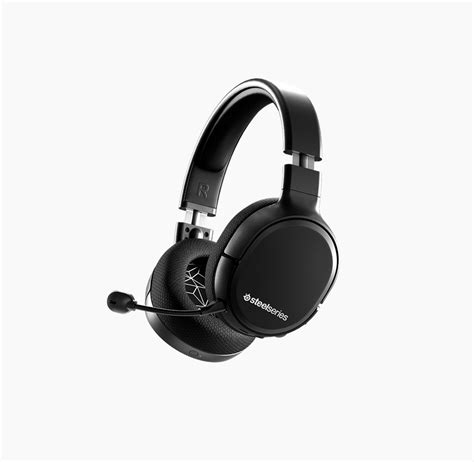
2. Wireless priorities
If low-latency gaming is essential, a 2.4 GHz dongle like the Arctis 1 Wireless offers better responsiveness than most Bluetooth headsets. For users who want seamless switching between phone and console, a Bluetooth-capable headset with multipoint pairing may be preferable.
3. Comfort and session length
Headband design, ear-cup material, and overall weight determine how comfortable the headset will be during long gaming or streaming sessions. The Arctis 1 Wireless emphasizes lightness and breathability, which benefits players in warm environments.
4. Microphone needs
For players who only need clear in-game chat, the Arctis 1 Wireless’s detachable mic is ample. For content creators and streamers requiring studio-level capture, plan to pair the headset with a separate USB or XLR microphone.
5. Budget and upgrade path
The Arctis 1 Wireless targets buyers who want wireless functionality without the premium cost of top-tier models. If future upgrades are planned, consider whether additional features like Bluetooth, longer battery life, or advanced software controls are worth the extra investment now.
6. Warranty and support
Look at the manufacturer’s warranty and support policies. Gaming headsets see a lot of wear from daily use; clear warranty terms and accessible customer support can save time and cost if components fail.
Maintenance and Longevity Tips
- Store the headset in a cool, dry place and avoid prolonged exposure to direct sunlight.
- Detach the microphone when traveling to protect the boom and jack.
- Wipe ear cushions with a lightly dampened cloth to remove sweat and oils; allow to fully dry before use.
- Check for firmware updates periodically via the manufacturer’s software on PC to ensure optimal performance and bug fixes.
Conclusion
The Arctis 1 Wireless is a focused, practical option for players who prioritize low-latency wireless gaming, cross-platform flexibility with USB audio, and lightweight comfort. It strikes a balance between performance and affordability, delivering the core Arctis experience—clear positional audio and a usable chat microphone—without the bells and whistles of higher-end models. For console players who want to cut the cord, PC gamers seeking a reliable wireless headset, or travelers needing a compact option, the Arctis 1 Wireless is worth considering. Prospective buyers should verify platform compatibility (especially USB connector types) and evaluate whether the lack of Bluetooth or some premium features matches their use case. With thoughtful setup and basic maintenance, the Arctis 1 Wireless performs well in real-world gaming scenarios and delivers dependable audio for everyday play.