Why Everyone is Buying the C34J791 Cj791 (Full Review)
When I first cleared off my desk to make room for the Samsung C34J791 (widely known as the CJ791), I wasn't entirely sure if I was making a wise investment or just falling for the ultrawide hype. I had been tethered to a dual-monitor setup for years, dealing with that annoying bezel right in the center of my field of vision. After six months of using this 34-inch curved powerhouse as my daily driver for everything from intensive spreadsheets to late-night gaming sessions, I finally understand why this specific model has maintained such a cult following despite newer OLED and Mini-LED panels hitting the market. It’s not just a monitor; for me, it has been a complete shift in how I interact with my computer.
I remember the day I unboxed it. The first thing that struck me wasn't the screen itself, but the Thunderbolt 3 connectivity. As a Mac user who occasionally dips into the PC world, I was tired of the "dongle life." I wanted one cable to rule them all. When I finally plugged it in and saw my workspace expand into that vast 21:9 landscape, I felt a genuine sense of relief. But beauty is only skin deep, and over the last half-year, I’ve found that the CJ791 has some fascinating quirks and hidden strengths that you won't find on a standard spec sheet. In this review, I’m going to share my honest, lived-in experience with this display, covering the highs, the lows, and the technical details that actually matter in day-to-day use.
The First Impressions: Aesthetics and Build Quality
Most monitors in the ultrawide category look like they belong in a futuristic gaming bunker. They are covered in aggressive red accents and jagged plastic. What I personally appreciated about the CJ791 from the moment I set it up was its professional, almost understated elegance. The white plastic back and the silver metallic stand give it a "clean" look that blends into a home office rather than dominating it. I noticed that the build quality is surprisingly dense. When I move my desk, there is very little of that cheap plastic creaking you get with lower-end panels.
The 1500R curve was something I had to get used to. At first, I felt like lines in my Excel sheets were slightly warped, but after about three days, my brain adjusted. Now, when I look at a flat 34-inch screen, it actually feels like it’s curving away from me in a weird, convex shape. The curve on the CJ791 feels purposeful; it brings the corners of the screen into my peripheral vision without forcing me to turn my head constantly. I’ve found this significantly reduces the neck strain I used to feel with my old dual-monitor setup.
The Thunderbolt 3 Experience: A Productivity Game Changer
If there is one reason I tell my colleagues to buy this monitor, it’s the Thunderbolt 3 integration. I’ve been using this for a mix of professional creative work and standard office tasks, and the single-cable solution is flawless. It provides 85W of power delivery, which is enough to keep my MacBook Pro topped off even when I’m rendering video or running heavy simulations. I was surprised by how much I valued the extra clutter-free space on my desk. One cable carries the video signal, the data for the USB ports on the back, and the power for the laptop. It’s seamless.
However, I did find a slight disappointment here. While there are two Thunderbolt ports, the second one only provides 15W of power. I tried to use it to fast-charge my tablet while working, but it was more of a "slow trickle" than a true rapid charge. Still, having the ability to daisy-chain another monitor or connect a high-speed external drive directly to the monitor has been a productivity lift I didn't know I needed until I had it.
Panel Performance: Quantum Dots and VA Reality
The CJ791 uses a VA (Vertical Alignment) panel with Samsung’s Quantum Dot (QLED) technology. In my experience, this is both its greatest strength and its most notable compromise. Let’s talk about the colors first. I was blown away by the vibrancy. With 125% sRGB coverage, the reds and greens pop in a way that my old IPS panels simply couldn't match. When I’m editing photos or just watching 4K nature documentaries, the depth of color is stunning. Because it’s a VA panel, the contrast ratio is around 3000:1. This is where it beats IPS panels hands-down. The blacks are deep and inky, which makes watching movies at night a much more immersive experience.
But, I have to be honest about the trade-offs. VA panels are notorious for "ghosting" or "black smearing," and the CJ791 is not immune. When I’m scrolling through a website with a dark background and white text, I notice a slight trail behind the letters. In fast-paced shooters like Counter-Strike, I found that high-contrast transitions aren't as snappy as they would be on a TN or high-end IPS gaming monitor. It’s not a dealbreaker for me because I’m not a professional gamer, but if you are sensitive to motion blur, it's something you will definitely notice within the first hour of use.
Daily Utility: The 21:9 Workflow
After testing for several months, the 3440 x 1440 resolution feels like the "Goldilocks" zone for productivity. It gives me enough vertical space to read long documents while providing the horizontal real estate to have three windows open side-by-side. I usually keep my primary browser in the middle, Slack on the left, and Spotify or a folder on the right. I noticed that I no longer use the "Alt-Tab" shortcut nearly as often as I used to. Everything I need is just... there.
Discover deals on Electronics — updated daily.
Browse Now →One thing that bothered me initially was the OSD (On-Screen Display) navigation. Samsung uses a single joystick on the back of the monitor. While it’s better than having five separate buttons that you can never remember the function of, it still feels a bit clunky when I’m trying to quickly switch between the Thunderbolt input and the DisplayPort input for my gaming PC. I wish there were dedicated "input" and "volume" buttons on the bottom bezel for easier access.
The Gaming Side of Things
Even though I bought this primarily for work, I couldn't resist putting the 100Hz refresh rate to the test. Coming from a standard 60Hz screen, the jump to 100Hz feels significant. Everything is smoother, from the mouse cursor moving across the desktop to the fluid motion in RPGs like The Witcher 3. After using 100Hz, 60Hz feels choppy and dated. Does it compete with 144Hz or 240Hz monitors? No. But for the casual or "immersion-focused" gamer, it’s a very sweet spot.
The monitor also supports FreeSync. I use an NVIDIA card, and I was pleased to find that "G-Sync Compatible" mode works reasonably well. I haven't experienced any major screen tearing, though I did encounter some flickering in very specific scenarios—usually on loading screens in certain games where the frame rate drops significantly. During actual gameplay, however, the experience has been solid. The ultrawide field of view in racing games like Forza Horizon is nothing short of breathtaking; it adds a level of peripheral awareness that makes the game feel entirely different.
Pros and Cons: A Realistic Breakdown
- Pro: Thunderbolt 3 Connectivity - The 85W power delivery and data transfer through a single cable is the cleanest setup I’ve ever had.
- Pro: Contrast and Black Levels - The VA panel provides deep blacks that make movies and dark games look significantly better than standard IPS displays.
- Pro: QLED Color Accuracy - Colors are vivid and saturated without looking "neon" or artificial, perfect for hobbyist creative work.
- Pro: Refined Aesthetics - The silver/white design looks premium and professional on a desk compared to "gamer-focused" alternatives.
- Pro: 100Hz Refresh Rate - Provides a much smoother experience than 60Hz for both productivity and gaming.
- Con: VA Smearing - Dark-on-light transitions can exhibit some trailing, which might annoy competitive gamers or those sensitive to motion blur.
- Con: Stand Adjustability - While the stand is sturdy, it lacks swivel adjustment. I can tilt it and change the height, but I can't turn it side-to-side without moving the whole base.
- Con: Viewing Angles - Being a VA panel, there is some slight color shifting if you aren't sitting directly in front of the screen.
- Con: 15W Secondary TB3 Port - The second Thunderbolt port is a bit weak for charging modern smartphones or tablets at full speed.
Comparison with Competitors
In my research before buying, I looked at several other 34-inch ultrawides. I wanted to see how the CJ791 stacked up against the more common IPS and high-refresh gaming models. Here is how I saw the landscape based on the specs and my hands-on comparisons at the tech store.
| Feature | Samsung C34J791 | Typical 34" IPS Office Monitor | 34" Gaming Ultrawide (High-End) |
|---|---|---|---|
| Panel Type | VA (Quantum Dot) | IPS | IPS or OLED |
| Contrast Ratio | 3000:1 | 1000:1 | 1000:1 to Infinite |
| Refresh Rate | 100Hz | 60Hz - 75Hz | 144Hz - 175Hz |
| Connectivity | Thunderbolt 3 (85W) | USB-C (65W) or HDMI | DisplayPort / HDMI |
| Color Range | 125% sRGB | 99% sRGB | 95% - 98% DCI-P3 |
Who Should Actually Buy This? (Buying Guide)
After six months, I don’t think this monitor is for everyone. It occupies a specific niche. If you are a hardcore competitive gamer looking for the fastest response times, you should probably look toward a high-refresh IPS or TN panel instead. The black smearing on VA panels will frustrate you in high-speed scenarios. However, if you fall into one of the following categories, I think the CJ791 is currently one of the best bangs for your buck on the market.
The MacBook Pro Power User
If you have a modern Mac, the Thunderbolt 3 integration is non-negotiable. I found that other monitors claiming "USB-C" support often struggled with flickering or dropped connections. The CJ791 has been rock-solid. Finding a monitor that charges your laptop and handles a high-resolution 100Hz signal over one cable at this price point is actually quite difficult.
The Spreadsheet and Document Warrior
If your day consists of having a PDF on one side, an Excel sheet in the middle, and a Word doc on the right, this monitor will change your life. I noticed that my cognitive load decreased because I wasn't constantly managing window layers. The height-adjustable stand is also great for getting the ergonomics just right to avoid slouching.
The "Mixed-Use" Home Office Worker
This is where I sit. I work for 8 hours, then I might spend an hour editing photos or playing a game. The CJ791 is the ultimate "jack of all trades." It’s color-accurate enough for creative hobbies, fast enough for casual gaming, and functional enough for serious professional work. Most monitors optimize for one of those areas and fail at the others; this one maintains a high floor across the board.
Discover deals on Electronics — updated daily.
Browse Now →Specific Disappointments: Things I Wish I Knew
I promised to be authentic, so there are two things that I really wish Samsung had handled differently. First, the speakers. To put it bluntly, they are terrible. I tried using them for a video call once, and it sounded like the people were talking through a tin can at the bottom of a well. If you buy this monitor, factor in the cost of a decent set of desktop speakers or a good pair of headphones. Don’t rely on the built-in audio for anything other than basic system notifications.
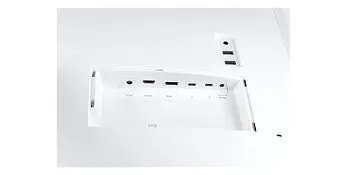
Second, the VESA mount adapter. Most monitors have the VESA holes built directly into the back. The CJ791 requires a separate circular bracket that comes in the box. It’s a bit fidgety to install, and because of the way the connections are recessed, it can be a nightmare to plug in cables once the monitor is actually mounted on an arm. I highly recommend plugging in all your cables before you snap the monitor onto its mounting arm, or you’ll be doing a lot of blind fumbling behind the screen.
Technical Performance Observations
During my time with the unit, I decided to do some informal color calibration. Out of the box, I noticed the "Standard" mode was a bit too "cool" (blue-ish) for my liking. I switched it to the "Custom" profile and bumped the Red and Green values up slightly. This warmed up the whites and made skin tones look much more natural in my video calls. I also noticed that the brightness is quite impressive. I sit near a large window, and even on sunny afternoons, I rarely have to push the brightness beyond 80% to see everything clearly. The anti-glare coating is effective without being so aggressive that it makes the screen look "grainy."
Power consumption is another factor I monitored. Because it’s pushing 85W to my laptop and running a QLED backlight, it does get quite warm to the touch along the bottom edge. It hasn't caused any performance issues, but it’s something to be aware of if you work in a very small, poorly ventilated room. I was surprised by how much heat a 34-inch display can generate when it’s working at full capacity.
Final Thoughts After Six Months
The Samsung C34J791 is a rare breed of hardware. It’s an older model in the tech world, yet it remains relevant because it solves a very specific set of problems with grace. It isn't the fastest monitor, and it isn't the most color-accurate pro-spec display in existence. But in my experience, it is the most balanced monitor I’ve ever owned. It took me from a cluttered, two-monitor mess to a streamlined, single-cable sanctuary.
I’ve grown to love the deep blacks of the VA panel, and while the occasional smearing during dark-mode scrolling reminded me of its technical limitations, the vibrant QLED colors more than made up for it. Every time I sit down at my desk, I still get a little "wow" moment when the screen wakes up and provides that expansive view of my work. If you are looking to upgrade your productivity setup and want a touch of premium design without spending thousands on a high-end Studio Display or an ultra-spec gaming OLED, the CJ791 is an incredible choice. It has its flaws, but for a real-world user who needs one screen to do everything, it’s a purchase I definitely don’t regret.
The reason why everyone is still buying this monitor is simple: it focuses on the features that actually improve your quality of life—like Thunderbolt 3 and a high-contrast ultrawide panel—rather than just chasing the highest numbers on a spec sheet. It turns a desk into a cockpit, and after six months, I can't imagine going back to anything else.