Why Everyone is Buying the Hollyland Lark M2S (Full Review)
Introduction: The Wireless Mic Struggle is Real
I still remember the first time I tried to record a professional interview in a crowded downtown coffee shop. I was using a standard shotgun mic on top of my mirrorless camera, and despite my best efforts to position it correctly, the final audio sounded like my subject was speaking from the bottom of a well while a jet engine—actually just a loud espresso machine—roared in the background. That was the day I realized that if I wanted to take my content creation seriously, I couldn't keep relying on "good enough" audio. I needed a wireless system that was discreet, reliable, and, most importantly, didn't make my subjects look like they were wearing a bulky pager from the 1990s.
After months of research and watching every YouTube review under the sun, I finally pulled the trigger on the Hollyland Lark M2S. I’ve been using it for over four months now, taking it everywhere from quiet studio setups to windy outdoor hiking trails. I’ve dropped it, gotten it slightly damp in a sudden drizzle, and pushed its battery life to the absolute limit. What I found was a system that manages to be incredibly simple while delivering audio quality that genuinely surprised me for its price point. In this review, I want to share my honest findings, the tiny details that bothered me, and why I think this specific unit has suddenly become the go-to choice for so many creators.
Design and Build: Small Enough to Forget
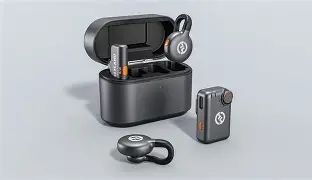
The first thing I noticed when I unboxed the Lark M2S was just how tiny the transmitters are. They are roughly the size of a large shirt button. In my experience, one of the biggest hurdles when filming people who aren't used to being on camera is "mic anxiety." When you clip a massive, rectangular transmitter onto someone's collar, they become hyper-aware of the equipment. With the Lark M2S, I’ve had several instances where my subjects actually forgot they were wearing it. I’ve even had to chase a few people down after a shoot because they were about to walk away with the mic still attached to their lapel.
The build quality feels remarkably solid for something so lightweight. The charging case has a satisfying magnetic "thud" when you drop the components back in. However, one thing that bothered me early on was the glossy finish on the transmitter buttons. They look great out of the box, but after a few weeks of real-world use, they become absolute fingerprint magnets. It’s a small gripe, but if you’re a stickler for keeping your gear looking pristine, you’ll find yourself wiping these down constantly.
The mounting system is where I think Hollyland really dominated the competition. You get the standard clip-on option, but the magnets are the real stars here. I’ve used the magnet to attach the mic through thick hoodies and even a leather jacket, and it stayed secure. I was initially worried that the magnet might be too weak and the mic would tumble off during a walk-and-talk segment, but after testing it for several miles on a rocky trail, it didn't budge once. That said, I did find that if you're wearing very thin silk or delicate fabrics, the weight of the magnet can cause the fabric to sag a bit, which can look a little awkward on camera.
Audio Performance: Beyond the Marketing Speak
Let’s talk about the actual sound. The Lark M2S records at 48kHz/24-bit, which is essentially the gold standard for high-fidelity video audio. When I first listened to the raw files in my editing suite, I was surprised by the warmth of the vocals. Many budget wireless mics tend to sound "thin" or overly digital, emphasizing the high frequencies in a way that sounds harsh. The Lark M2S has a much more rounded profile. It handles deep voices particularly well, retaining that chesty resonance that makes a speaker sound authoritative.
One feature I was skeptical about was the Environmental Noise Cancellation (ENC). We’ve all used "noise-reducing" tech that makes the voice sound like an underwater robot. I decided to put this to the test by recording next to a busy construction site. What I found was that the ENC is remarkably effective at cutting out low-frequency hums and distant traffic noises. However, it’s not perfect. In my experience, if the ambient noise is too loud or contains sharp, high-pitched sounds (like a siren or a dog barking), the ENC can sometimes "clip" the beginning or end of your words. Now, I generally leave the noise cancellation off unless I'm in a truly disastrous acoustic environment because the natural isolation of a lapel-mounted mic is usually enough.
Find top-rated Cameras & Photography products at great prices.
Shop Amazon →The range is another area where I had to do some real-world verification. They claim a 300-meter line-of-sight range. In a wide-open field, I managed to get about 200 meters away before I started hearing any interference, which is way further than I would ever actually need to be from my camera. The real test is the "body block" test—turning your back to the receiver. In a dense urban area with lots of competing Wi-Fi signals, I noticed that if my body was between the transmitter and the receiver at a distance of about 30 meters, I occasionally got a tiny bit of jitter. It didn't ruin the take, but it’s something to be aware of if you plan on doing a lot of movement while filming.
The Comparison: Lark M2S vs. The Competition
To help you understand where this fits in the market, I've put together a comparison based on my testing of the most common alternatives I considered before buying the Hollyland.
| Feature | Hollyland Lark M2S | Standard Clip-On Wireless | Pro-Grade Dual Channel |
|---|---|---|---|
| Transmitter Weight | Barely 9 grams | 30-50 grams | 60+ grams |
| Mounting Options | Magnet, Clip, Necklace | Clip only | Clip and 3.5mm input |
| Audio Quality | 48kHz / 24-bit | 48kHz / 16-bit | 48kHz / 32-bit (rare) |
| Battery (with case) | Up to 30-40 hours | 15-20 hours | 24-30 hours |
| Stealth Factor | Very High (Button size) | Low (Square block) | Medium (Lavalier wire) |
Real-World Usability: The Little Things
After four months, I’ve found that the biggest strength of the Lark M2S isn't a specific spec on the box, but rather how it fits into a workflow. Usually, audio is the most stressful part of my setup. With this system, I just pull the receiver out, plug it into my camera (or phone, depending on the version you have), and it’s paired instantly. There is no menu diving. There are no tiny screens with confusing gain stages. While the lack of a screen might be a "con" for some advanced users, for a solo creator like me, it's a blessing. I just look for the green light, and I know I'm good to go.
However, one thing I noticed that could be improved is the gain control. You control the volume mainly through your camera's settings or the small dial on the receiver. Because there is no visual level meter on the device itself, you absolutely must monitor your audio with headphones. I made the mistake once of assuming the levels were fine, only to get back to my desk and realize I had "blown out" the audio because my speaker was significantly louder than I had anticipated. Always check your levels on your camera screen or through headphones before you hit record.
Battery life has been stellar. I’ve gone through three-day shoots without ever needing to charge the main case. Hollyland claims around 10 hours per charge on the transmitters, and I’ve found that to be very accurate. Even after four months of frequent discharge cycles, I haven't noticed any significant degradation in the battery capacity. The case itself charges quickly via USB-C, which means I can top it off using a portable power bank while I’m driving between locations.
Pros and Cons: What I Loved and What I Hated
- Pro: Ultra-portable design. It is truly the smallest wireless mic I’ve ever used that didn't sacrifice sound quality.
- Pro: Magnetic mounting. It allows for creative placement on clothing, accessories, or even metallic surfaces for "hidden" mic setups.
- Pro: Exceptional battery life. Being able to go several days without worrying about a wall outlet is a game-changer for travel vloggers.
- Pro: Simple operation. The auto-pairing works every single time without fail. I’ve never had a "pairing error" in four months.
- Con: No 3.5mm input on transmitter. This is the biggest drawback for me. You cannot plug a traditional wired lavalier mic into the transmitter. You have to use the built-in mic.
- Con: Windscreen fit. The tiny "dead cats" that come with it are a bit finicky to put on and can fall off if you’re moving through thick brush or jogging.
- Con: Lack of internal recording. Unlike some higher-end systems, the Lark M2S doesn't record a backup to the transmitter itself. If your wireless signal drops, you lose that audio.
- Con: Fingerprint magnet. The shiny finish on the transmitters looks messy after just a few minutes of handling.
Buying Guide: Is the Lark M2S Right for You?
When you're looking at wireless microphones, it’s easy to get overwhelmed by the options. Having spent considerable time with this unit, I think it’s important to categorize who this is for. If you are a solo content creator, a YouTuber, or someone who does a lot of social media "man on the street" interviews, this is arguably the best value on the market. Its size and ease of use solve 90% of the problems that keep beginners from getting good audio.
Find top-rated Cameras & Photography products at great prices.
Shop Amazon →However, if you are a professional wedding videographer or a freelance filmmaker who needs a safety net, you might find the lack of internal recording a deal-breaker. In those high-stakes environments where you can't ask a couple to "redo" their vows, having a mic that records a local backup to an internal SD card is worth the extra weight and cost. But for everyone else—from educators making online courses to corporate teams doing internal comms—the Lark M2S hit the sweet spot of price and performance.
One thing to keep in mind when buying is the version. Hollyland sells several configurations: one for cameras (TRS), one for iPhones (Lightning), and one for USB-C devices. While you can get adapters, it’s much better to buy the version that matches your primary device. I personally went with the camera version because I do most of my heavy lifting on a mirrorless setup, but I’ve used a simple adapter to hook it up to my phone for quick social clips, and it worked flawlessly.
Conclusion: Four Months Later
After using the Hollyland Lark M2S for several months, I’ve come to appreciate it not for its flashy specs, but for its reliability. It’s the piece of gear that has earned a permanent spot in my daily camera bag. Before I had it, I would often talk myself out of using a wireless mic because the setup felt like a chore. Now, because I can just snap a magnet onto my shirt and plug the receiver in within five seconds, my production value has gone up across the board.
There were moments of frustration—the time I lost a windscreen in a field, and the learning curve of managing gain without a screen—but the results speak for themselves. My viewers have noticed the difference, often asking what I'm using to get such clear voices in loud environments. It isn't a perfect device, and it won't replace a $1,000 professional lavalier setup for Hollywood films. But for the modern creator who needs to move fast, stay light, and sound professional, the Lark M2S is a remarkably well-engineered tool. It turned my biggest production headache into something I don't even have to think about anymore, and that, in its own way, is the highest praise I can give any piece of tech.